
First of all you need to have a copy of windows along with the Serial key or product id.
you have two scenario. 1. First you have already loaded windows in your system
2. your system doesn't have nay windows
1. First you have already loaded windows in your system
Insert the windows disc in your CD or DVD reader, if your computer is set up with auto play mode a welcome screen will appear, you need to click on the Install Windows XP and follow the wizard.
And if your computer is not set for the auto play option then just go to your optical drive (CD or DVD) and find the installer (autorun.exe) double click the .exe file and wizard will appear.
2. your system doesn't have any windows
First insert the windows in your CD or DVD drive, Restart Your computer, Keep on presing ctrl + Alt + Del key to pull up the Boot device selection option (the key combination for this option may deffer), select your DVD or CD drive to Boot from.
Your system will ask you to press space to boot from cd (it only appears for a few seconds),, press the Space bar, Windows XP Setup begins. During this portion of setup, your mouse will not work, so you must use the keyboard. On the Welcome to Setup page, press Enter. Next You will find windows xp licence agreement page press F8 to continue, you will be directed to a page where you have to select the hard drive partition where you need to select where you want to install your windows select the partition and select enter. If the hard drive does not have any partition thent you will need to allocate the space as you need. For more detail's read my Partition and format page. You will be redirected to a next page where you will manage to find the Formatting file system, if the partition is formatted earlier the in the list you will find the option Leave the current file system or if it is not use NTFS file system,you could also use a quick format using NTFS file system.
Windows XP erases your hard disk drive using a process called formatting and then copies the setup files. You can leave your computer and return in 20 to 30 minutes.
 |
| windows xp |
you have two scenario. 1. First you have already loaded windows in your system
2. your system doesn't have nay windows
1. First you have already loaded windows in your system
Insert the windows disc in your CD or DVD reader, if your computer is set up with auto play mode a welcome screen will appear, you need to click on the Install Windows XP and follow the wizard.
And if your computer is not set for the auto play option then just go to your optical drive (CD or DVD) and find the installer (autorun.exe) double click the .exe file and wizard will appear.
 |
| wizard |
2. your system doesn't have any windows
First insert the windows in your CD or DVD drive, Restart Your computer, Keep on presing ctrl + Alt + Del key to pull up the Boot device selection option (the key combination for this option may deffer), select your DVD or CD drive to Boot from.
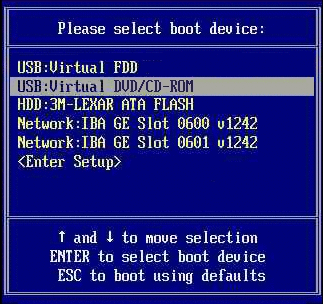 |
| Boot Device Menu |
Windows XP erases your hard disk drive using a process called formatting and then copies the setup files. You can leave your computer and return in 20 to 30 minutes.
During this process the computer will restart several times leave as it is.
Now a wizard will appear follow the wizard it will ask you about Your Product Id, Time zone name and etc. provide it and follow the wizard.

No comments:
Post a Comment